🎃 Haunt Hunt Help
Coordinating Halloween haunts for you and your friends
Research haunts, plan optimized routes, vote with your group, and coordinate logistics—all in one place. No more scattered texts and emails.
Work in Progress
This help documentation is actively being improved and refined. Some sections may be incomplete or become outdated as features evolve.
Expect ongoing updates as the app is fine-tuned based on real usage. If you notice something that doesn't match the actual app behavior, use the Feedback button to let us know!
Welcome to HauntHunt!
HauntHunt helps you coordinate Halloween haunted house trips with your group in four ways:
Organization
Plan which haunts to visit, when, and within what budget
Coordination
Vote democratically on routes or follow your organizer's picks
Communication
Group chat and route-specific threads keep everyone coordinated without endless texts
Day-of Assistance
Navigate together, check in at haunts, rate experiences, and track your group in real-time
Note: We're always improving based on feedback. See what's coming next below!
🔐 Who Can Use HauntHunt?
✅ Public Access (No Login)
- Browse all 15+ Southern California haunts
- View haunt details, dates, hours, and costs
- Read this help documentation
👥 Member Access (Login Required)
- Create or join groups
- Vote on route options
- Use Today's Haunts navigation
- Send group messages
- Submit feedback and new haunt suggestions
- Rate haunts after visiting
⚙️ Admin Access (By Invitation)
- Generate optimized routes
- Manage groups and members
- Add/edit haunted houses
- Review haunt submissions
🔑 How to Get Member Access
- Sign in with Google - Click the sign-in button on the homepage
- Request access - You'll be prompted to request approval
- Wait for approval - Usually within 24-48 hours (this is a nights-and-weekends project!)
- Get notified - You'll receive an email when you're approved
⚠️ Limited Capacity
This is a personal project with limited infrastructure. I can support a small number of groups each season.
If you're interested in using HauntHunt, request access early. If capacity is reached, I'll add you to a waitlist for next Halloween.
Your First Time as a Member
Total time: ~5 minutes
- Receive invite - Get a text with invite code or link from your friend
- Sign in - Click the link, sign in with Google
- Auto-join or request access - If your email is whitelisted by the organizer: You're in instantly! ✨ If not whitelisted: Request access, wait for approval (usually 24-48 hrs)
- Join group - Click the invite link to join your group
- Vote on routes - See proposed routes, check your calendar, vote "can make it" or "can't" (30 seconds each)
- Done! - Wait for the organizer to announce which route won
On haunt night, open the app and click "Today's Haunts" to follow along.
Member Journey Flow

Your First Time as an Organizer
Total time: ~20 minutes setup, then monitor voting
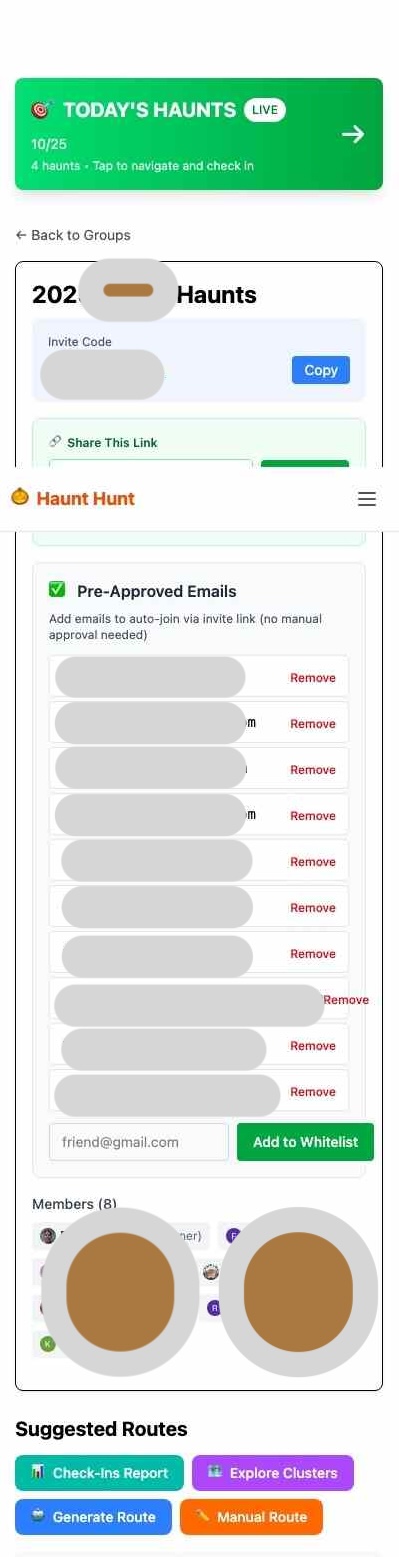
- Create group - Sign in, create your group, get invite code
- Whitelist members (optional) - Add Gmail addresses to auto-approve trusted friends
- Generate routes - Pick strategy, set filters, generate (~60 seconds)
- Review Route Plans - Click into each Route Plan to see detailed info: timing, costs, distances, operating hours
- Edit Route Plans - Adjust haunts, reorder, fine-tune timing
- Save as Permanent - Click "Save as Permanent" on the Route Plans you want members to vote on
- Invite friends - Text the invite code or link. Whitelisted emails auto-join (no approval needed!)
- Monitor voting - Check vote counts daily, see who can make what
- Select for activation - Once votes settle, click "Select for Today" on winning route(s) to pre-schedule
- Done! - Send reminder text on haunt day: "Check Today's Haunts on the app!"
Pro tip: Generate 2-3 route options for different dates to maximize participation.
Organizer Journey Flow

Day-of Haunt Night Experience
Smooth coordination throughout the night
- Open Today's Haunts - See your full route with all haunts in order
- Leaving home - Check in as "Leaving Home" so your group knows you're on the way
- Navigate to first haunt - Tap "Get Directions" to open Google Maps
- Arrive & park - Check in as "Parked", optionally save parking location
- Go through haunt - Check in as "In Line" → "Going In" → "Leaving Haunt"
- Rate the haunt - Quick 15-second rating while impressions are fresh
- Repeat for next haunts - Navigate → Park → Experience → Rate
- Finish the night - Check in as "Done" after your last haunt
Everyone in your group can see check-ins in real-time, so no more "where are you?" texts!
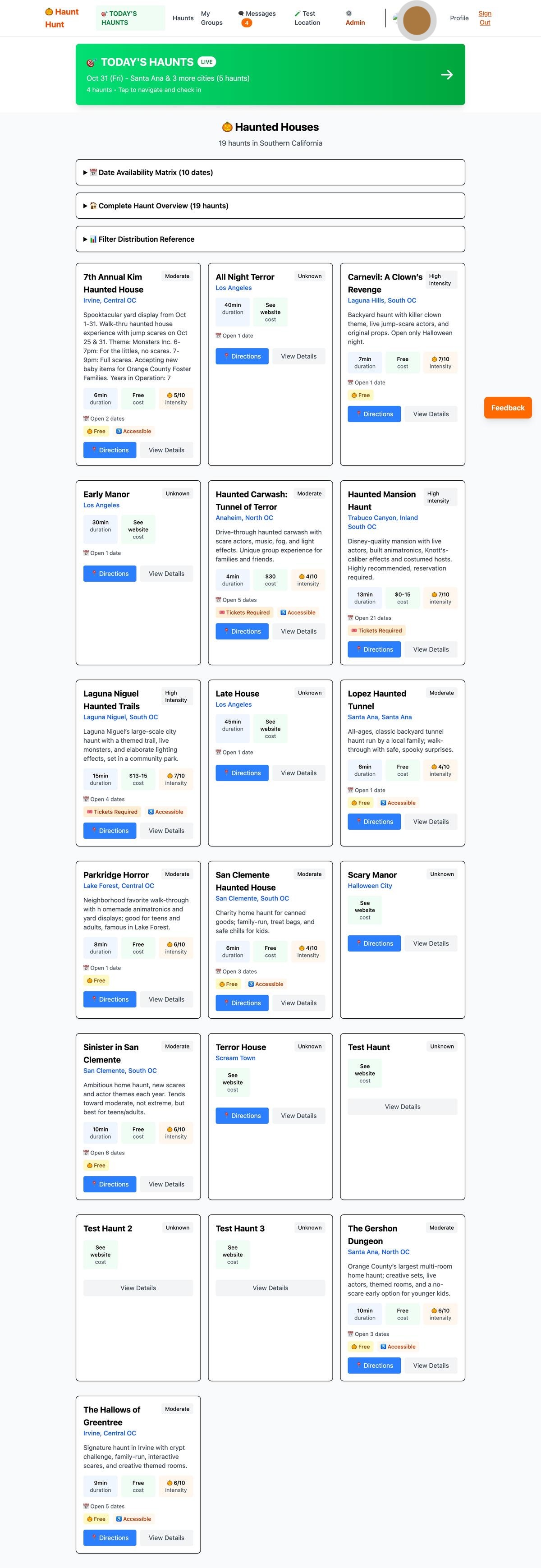
Browse Haunts
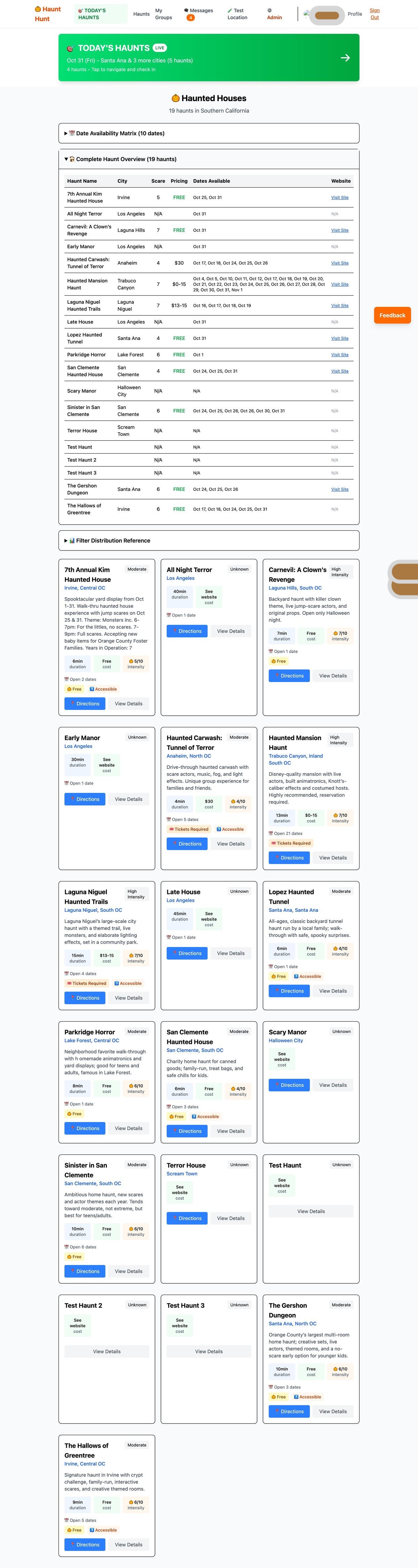
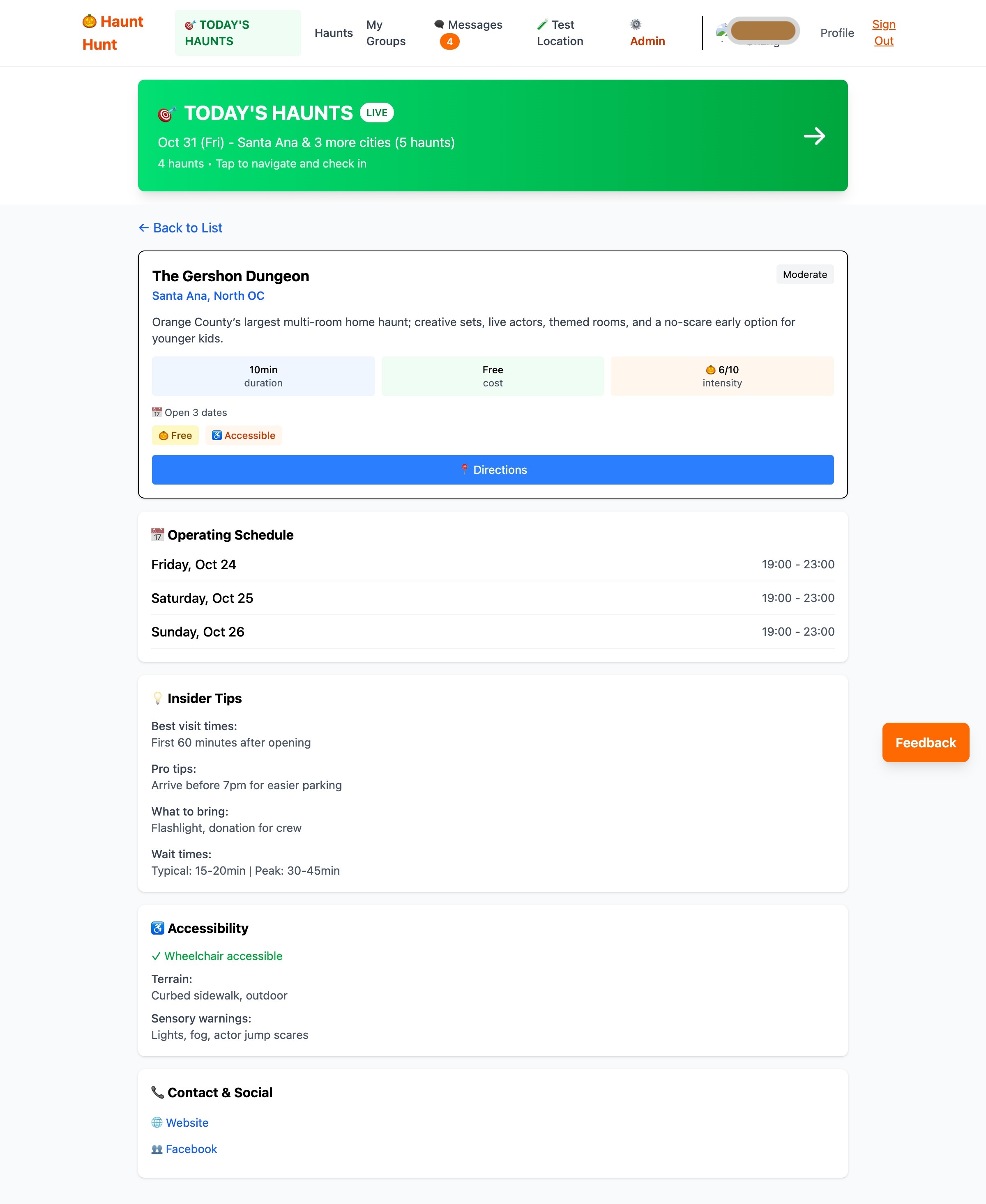
Explore 15+ Southern California haunted houses with all the details you need: operating dates, hours, costs, scare levels, and descriptions.
How to use:
- Click "Haunts" in the navigation menu
- Use filters to find haunts by region, type, cost, dates, or scare level
- Click any haunt to see full details, photos, and ratings from your group
- Tap "Get Directions" to navigate to a haunt
Explore Clusters (Geographic Discovery)
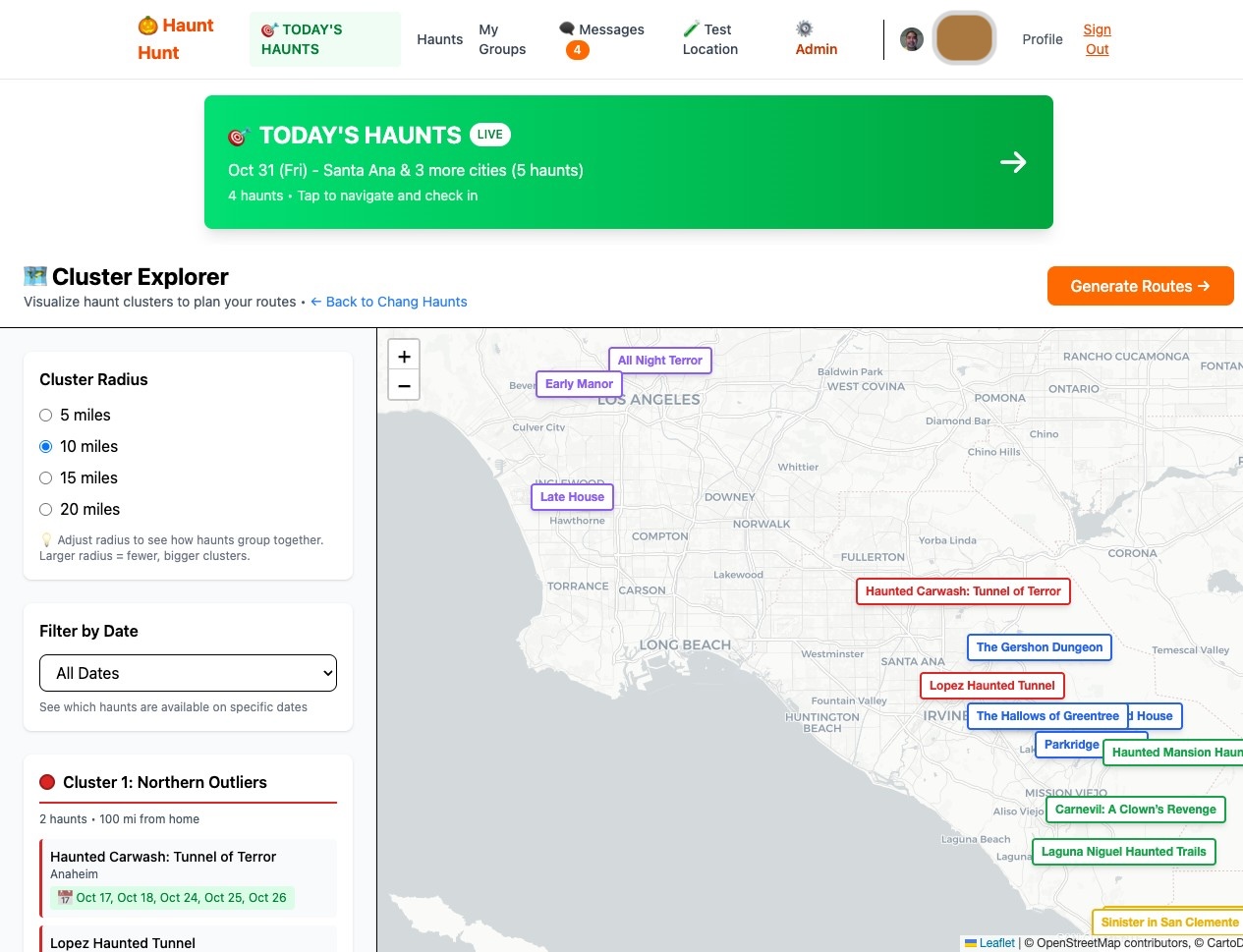
Visualize haunts geographically to discover clusters in your area. Perfect for planning efficient routes or finding haunts near each other.
How to use:
- Navigate to Haunts → Explore Clusters (or from your group page)
- See haunts plotted on a map by region
- Click clusters to see grouped haunts
- Use filters to narrow by date, scare level, or pricing
- Identify haunt-dense areas for efficient route planning
Desktop view recommended for best map interaction.
Vote on Routes
When someone creates route options for your group, you can vote on which ones work for your schedule. It takes about 30 seconds and helps the organizer see which dates have the most support.
How to use:
- Go to your group page and click on a proposed route
- See route details with dates, haunts, and estimated times
- Click either "I can make this! ✓" or "Can't make it ✗"
- You can change your vote anytime before the trip
- Vote results show in real-time below your vote buttons
Today's Haunts (Day-of Navigation)
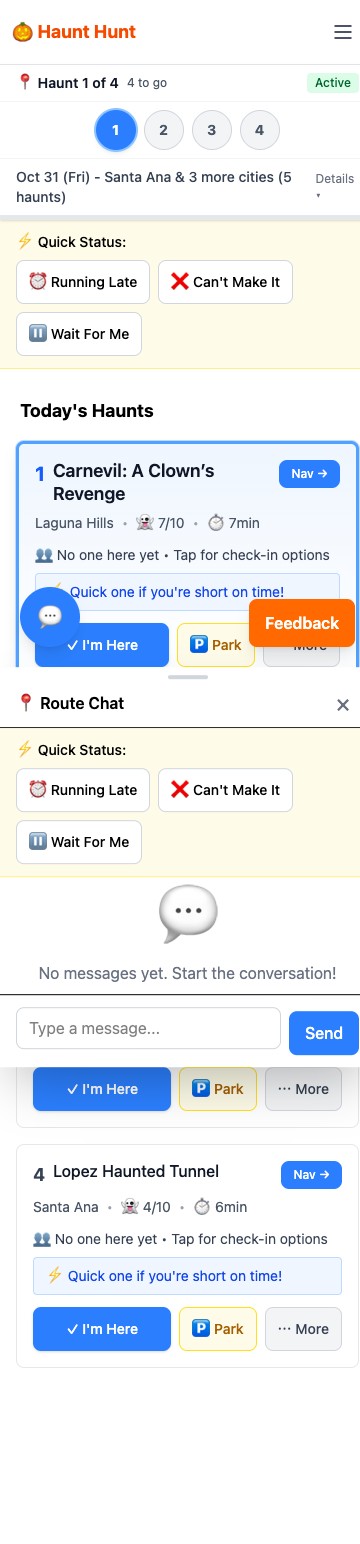
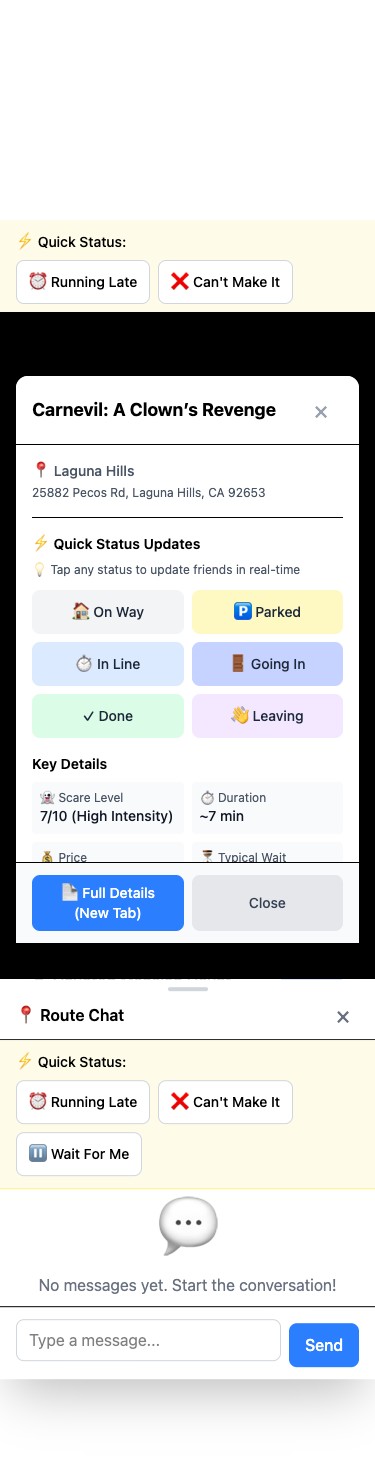
On haunt night, Today's Haunts becomes your command center. Get directions, check in at each location, see where your group is, and rate haunts as you go.
How to use:
- Click "Today's Haunts" in navigation (appears on your route day)
- See all haunts for the night in order
- Tap "Get Directions" to open Google Maps for navigation
- Check in as you progress: Leaving Home → Parked → In Line → Going In → Leaving Haunt → Done
- Optional: Save parking location with GPS to find your car later
- See real-time check-ins from your whole group
- Rate each haunt after you leave (15 seconds)
Rate Your Experiences
After leaving each haunt, you'll be prompted to rate it. These ratings help your group remember which haunts were great for next year.
How to use:
- After checking out from a haunt, you'll see a rating prompt
- Give 1-5 stars for overall experience
- Rate the scare factor (1-5)
- Select if you'd return: Yes / Maybe / No
- Add tags: Scary, Fun, Creative, Long Wait, etc.
- Takes 15 seconds, captures impressions while they're fresh
Your group's ratings are only visible to your group members and help inform next year's planning.
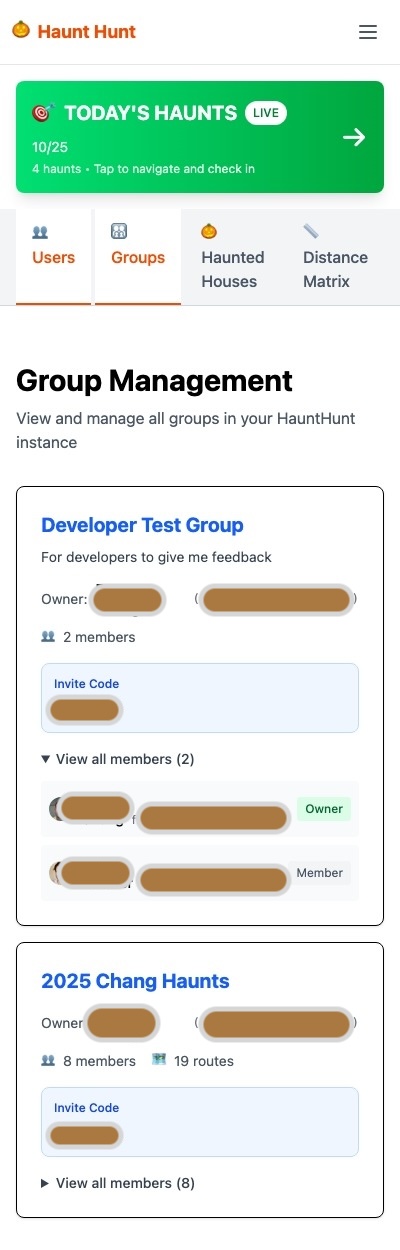
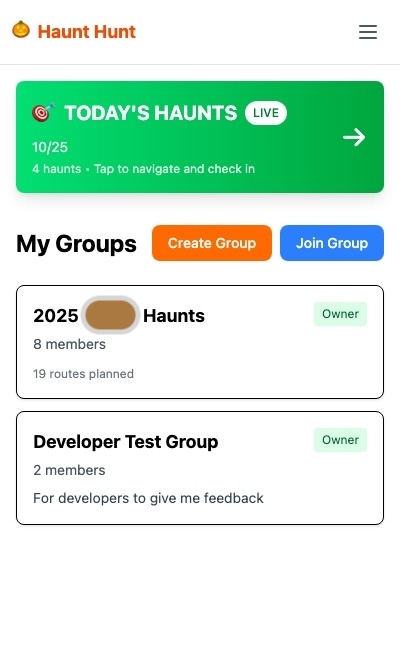
Create Your Group
Groups are your private coordination space that persists year after year. Create once, use every Halloween.
How to create:
- Sign in with Google
- Click "Create New Group"
- Name your group (e.g., "Smith Family Halloween 2025")
- Get your unique invite code to share with friends
- Share the code via text or the pre-filled invite link
- Approve members as they request to join
Understanding Route States
Routes have three states in HauntHunt. Understanding these states helps you manage your planning workflow:
📝 Route Plan (Draft)
- Created from route generation or manual building
- Fully editable by owner
- Shows detailed planning info (timing, costs, distances)
- NOT visible to members for voting yet
- Access at: /groups/[id]/route_plans/[id]
💾 Permanent Route (Votable)
- Created by clicking "Save as Permanent" on a Route Plan
- Members can now see and vote on it
- Still editable by owner
- Shows vote tallies in real-time
✅ Active Route (Today's Haunts)
- Created by "Select for Today" button
- Pre-scheduled to show on specific haunt date
- Appears in "Today's Haunts" navigation on that day
- Used for day-of navigation and check-ins
The Workflow:
Generate/Build → Review Route Plan → Edit as needed → Save as Permanent → Members vote → Select for Today (schedule) → Auto-activates on haunt day
Route State Flow

Generate Routes (Automatic)
Let the algorithm build optimized routes in 60 seconds. Routes are saved as "Route Plans" first - editable drafts with detailed planning information.
How to generate:
- On your group page, click "Generate Routes"
- Choose a strategy (Completionist, Specific Dates, etc.)
- Set filters:
- Dates available (check all dates your group might go)
- Scare level preference
- Budget (free only, free preferred, or no limit)
- Max drive time per night
- Starting location and time
- Click "Generate Routes"
- Review the Route Plans - see haunts, costs, drive times, timing details
- Click into each Route Plan to see the full planning view
- Edit Route Plans as needed (add/remove haunts, reorder, adjust timing)
- Click "Save as Permanent" to make routes votable by your group
After saving as permanent, routes appear on your group page for member voting.


Review Route Plans (Planning View)
After generating routes, each route is saved as a "Route Plan" - a detailed planning view with all the information you need to evaluate and edit routes.
Route Plan View Shows:
- Full timeline with arrival/departure times for each haunt
- Drive times between haunts
- Total route duration and distance
- Individual haunt costs and total cost
- Operating hours for each haunt
- Addresses and navigation links
- Buffer times and schedule optimization
How to access:
- After generating routes, click "View Route Plans" on your group page
- Or navigate directly: /groups/[your-group-id]/route_plans
- Click into each Route Plan to see full details
- Edit haunts, timing, or order as needed
- When satisfied, click "Save as Permanent" to make votable
Note: Route Plan view is desktop-optimized. Use a laptop/desktop for best experience when reviewing and editing complex routes.

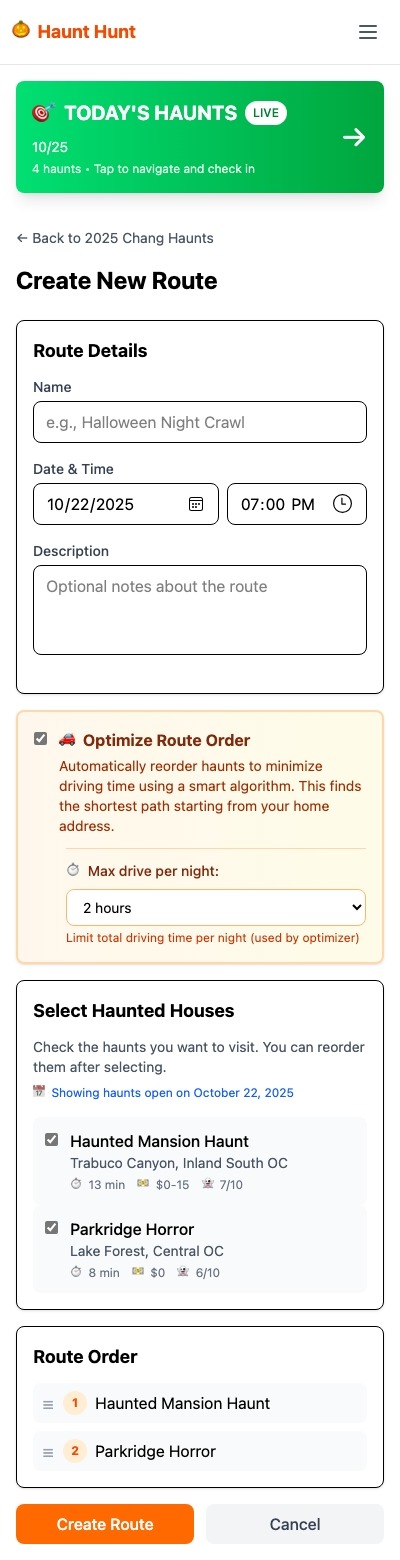
Build Routes Manually
If you prefer full control or have specific requirements, build routes manually by selecting haunts and ordering them yourself.
How to build:
- Click "Create Route" on your group page
- Select a date and name your route
- Browse or search haunts and add them to your route
- Drag to reorder haunts for optimal driving sequence
- Save the route to add it to your group
Track Voting & Results
See vote tallies at a glance and identify which routes have the most support. Then pre-schedule which routes activate on haunt day.
How to track:
- View each route on your group page
- See vote counts: "✅ Can make it" vs "❌ Can't make it"
- See who voted for what (transparent voting)
- Identify winning route(s) based on highest support
- Click "Select for Today" to pre-schedule when route becomes active
"Select for Today" Button:
- Pre-schedules which route(s) will show in "Today's Haunts" on haunt day
- You can select routes IN ADVANCE for future dates
- Members will automatically see the route in "Today's Haunts" navigation on that date
- No need to manually activate on the day of!
Tip: Select your route a few days before haunt night so everyone knows the plan.
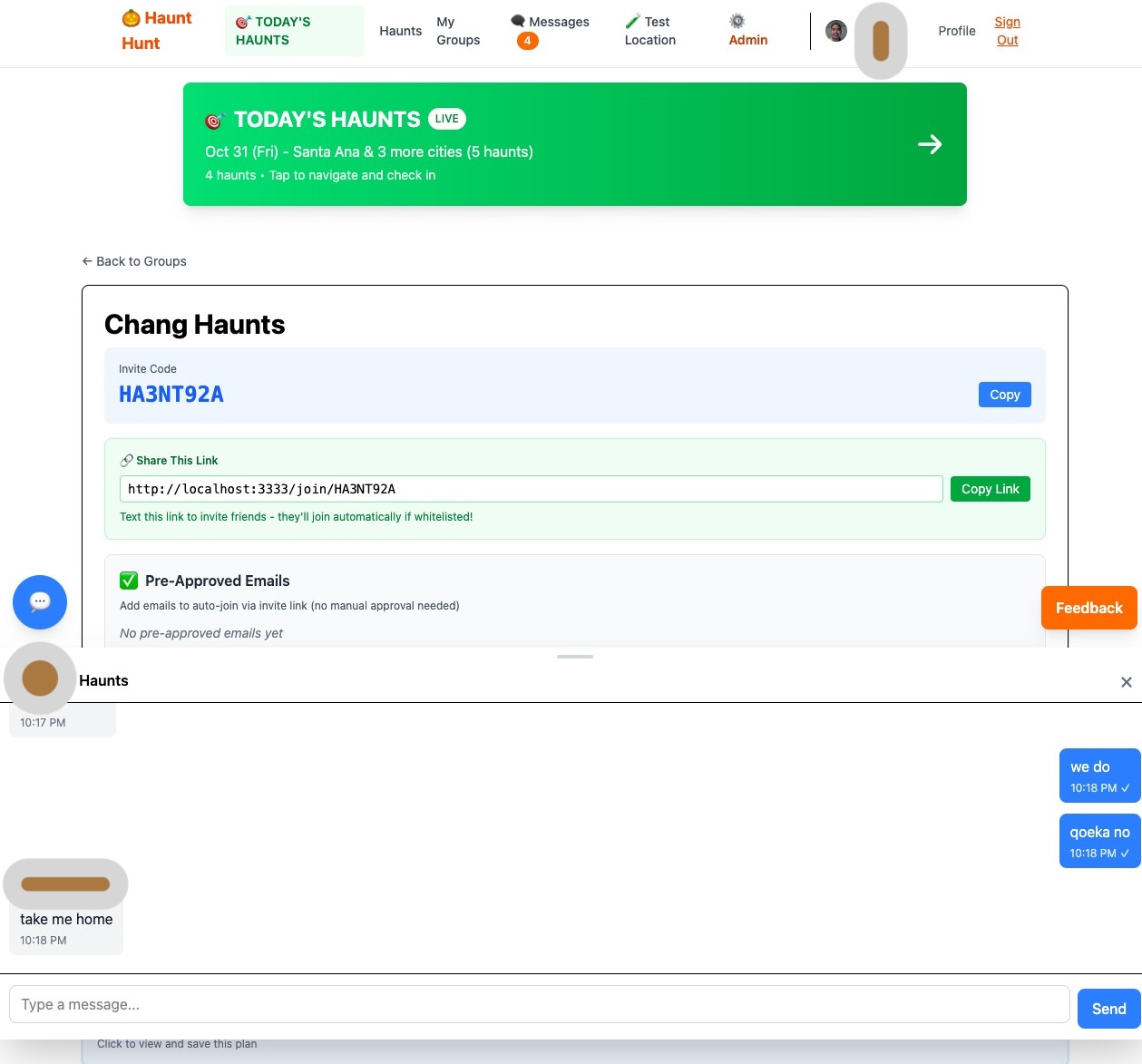
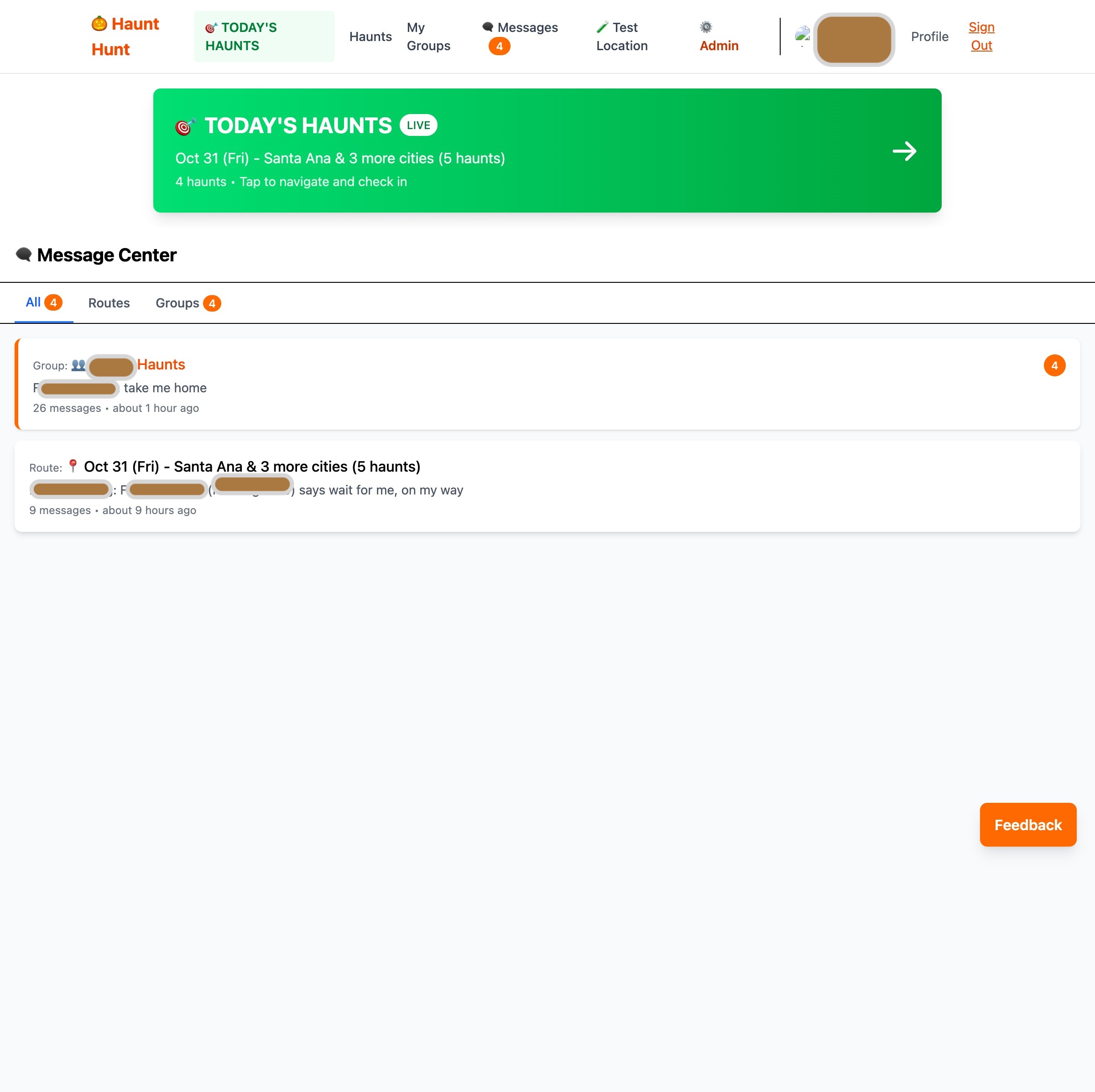
Group Messaging
Stay coordinated with your group through real-time messaging. Share updates, ask questions, and keep everyone on the same page without endless group texts.
How to use:
- Click the chat bubble icon in the navigation or group page
- See all your group conversations in the Message Center
- Send messages that update in real-time for all group members
- Use quick status buttons for common updates ("Running late", "Almost there", etc.)
- Badge shows unread message count across all conversations
Messages are private to your group and perfect for day-of coordination.
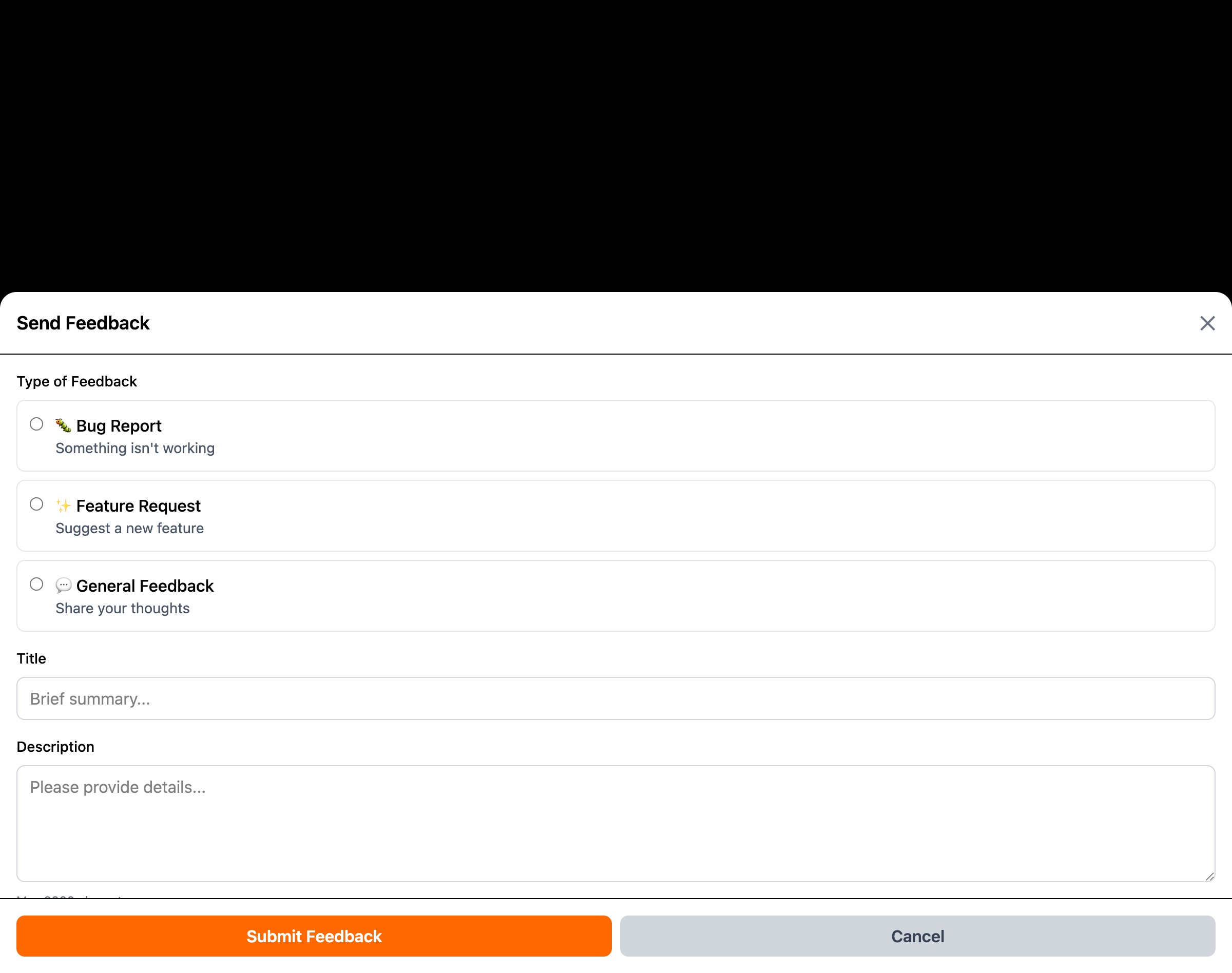
Submit Feedback
Found a bug? Have a feature idea? Just want to say something? Use the feedback button to send reports, suggestions, or general comments directly to the admin.
How to use:
- Click the orange feedback button (bottom-right corner on most pages)
- Choose: Bug Report, Feature Request, or General Feedback
- Describe your issue or idea
- Submit - your feedback goes directly to the admin
- Admin can respond via the messaging system
Your feedback helps make HauntHunt better. All suggestions are reviewed.
Submit New Haunts
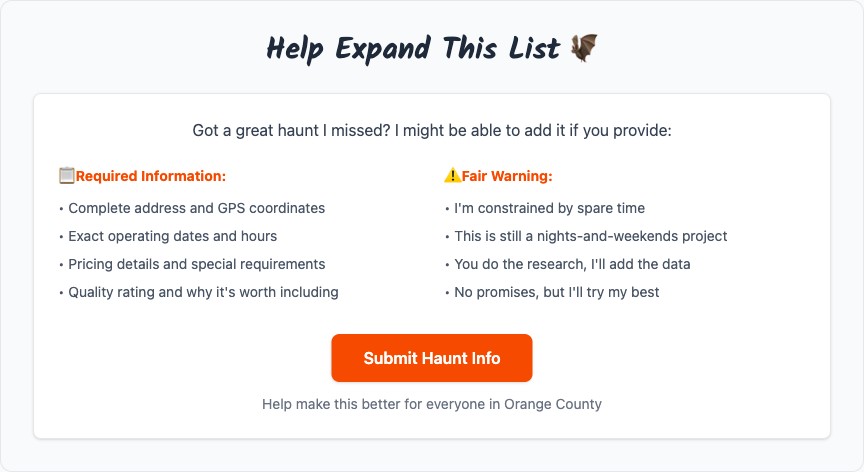
Know a great haunt that's not on the list? You can submit it for review using Perplexity AI to gather the required details.
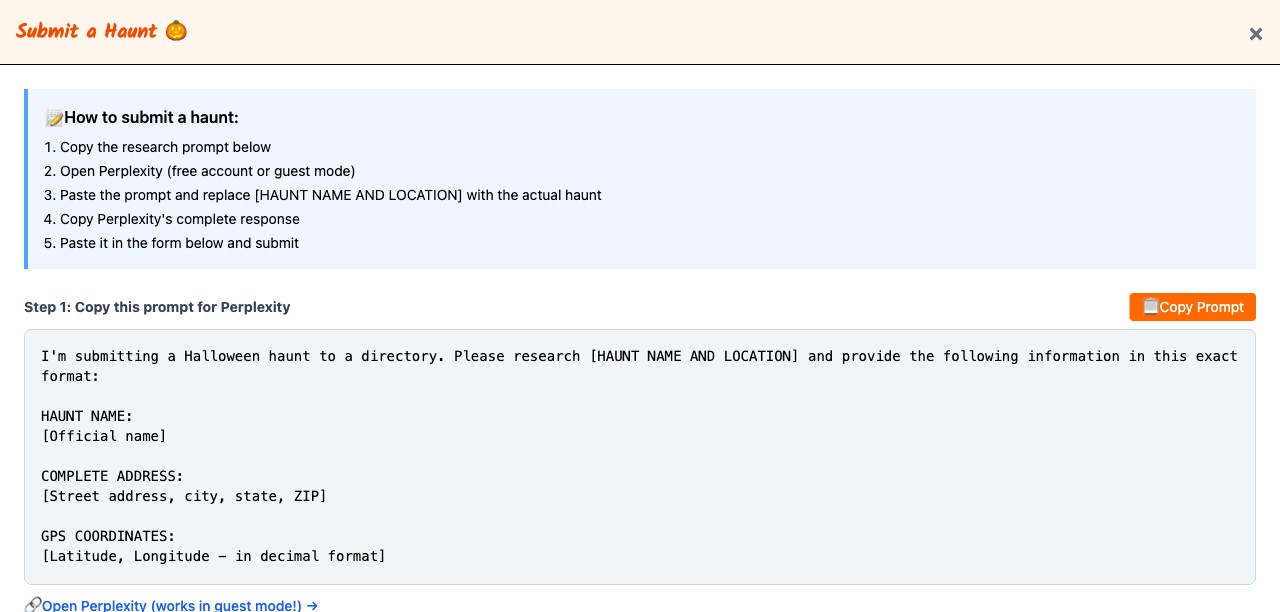
How to submit:
- Click "Submit Haunt Info" on the home page (approved users only)
- Follow the step-by-step instructions to use Perplexity AI for research
- Copy the AI-generated haunt details
- Paste into the submission form
- Submit for admin review
What's needed:
- Complete address and GPS coordinates
- Operating dates and hours
- Pricing details
- Description and scare level
- Quality assessment and why it's worth adding
Submissions are reviewed manually. No promises on turnaround time, but you do the research and I'll add quality haunts.
💬 Why This Beats Group Texts
The real magic: Everything organized by context, all in one place
Stop digging through scattered texts, emails, and different chat apps:
"Saturday route: Who's driving? Drinks after?"
No more scrolling through 500 messages to find an address or arguing about what you decided last week.
These features require geolocation but aren't built yet. The app works fine without location permissions now.
For Your Private Group
Once location features are built:
- Auto check-in/out - Track who's actually arrived at each haunt
- Distance tracking - "You're 15 min from the next stop"
- Stragglers alert - "Mike is still 20 min out, should we wait?"
- Live rerouting - Haunt closed early? Auto-suggest alternatives nearby
- Post-haunt stats - "Your group hit 6 haunts, 42 miles, 4 hours"
- Year-over-year - "Last year you did 8 haunts, can you beat it?"
For the Community (Public Features)
Eventually opening this up beyond private groups:
- Public haunt discovery - Browse all SoCal haunts with crowd ratings
- Heat maps - See which haunts are packed vs dead RIGHT NOW
- Live wait times - Based on check-in data from all users
- Crowd predictions - "Parkridge Horror usually hits peak at 8 PM"
- Social proof - "12 other groups are hitting Haunted Within tonight"
- Smart alerts - "Skip Carnevil, 90 min wait right now"
- Leaderboards - Top groups by haunts visited this season
Why location matters:
Not just for your group's coordination, but eventually for crowd-sourced intel that helps the whole community. Real-time data makes everyone's Halloween better.
Right now, this is for private groups you create and invite. Public features are on the roadmap.
Can I vote on multiple routes?
Yes! Vote on every route that works for your schedule. This helps the organizer see which options are most popular with the group.
Can I change my vote?
Anytime. There's no voting deadline—the organizer decides when to finalize plans based on the group's responses.
What if I can't make any of the routes?
Vote "Can't make it" on all of them and explain your constraints in the group chat. The organizer might generate new route options that work better for everyone.
How is this different from just texting?
With group texts:
- "Can anyone do Friday?" buried in 200 messages
- Someone suggests a haunt, no one remembers the address
- Half the group on WhatsApp, half on Discord
- Day-of: "Wait, where are we meeting again?"
With Haunt Hunt:
- All route options with real data (drive times, costs, schedules)
- Organized voting—see popularity at a glance
- Route-specific chats keep logistics organized by day
- Personalized navigation with departure times
- Everything in one place, searchable
Do I need to enable location permissions?
Not yet. Location features are planned but not built. The app works perfectly fine without location permissions right now.
Is this just for private groups?
Right now, yes—you create private groups and invite your friends. Public discovery and community features (crowd ratings, heat maps, etc.) are on the roadmap for future years.
Can I join multiple groups?
Yes, though realistically most people focus on one main Halloween crew. You could have a "college friends" group and a separate "family" group if needed.
Can anyone see my group's plans?
No. Groups are 100% private. Only people you specifically invite can see your routes, votes, and group chats.
Google Maps on my phone ignores the "arrive by" time. Is this a bug?
This is a Google quirk, not a Haunt Hunt bug. The Google Maps mobile app sometimes ignores arrive-by parameters (works great on desktop).
Workaround: Note the route start time (e.g., "5:00 PM") and manually set "arrive by 5:00 PM" in Google Maps after the app opens.
I found a bug or have feedback. How do I report it?
Use the orange Feedback button on most pages, or your group chat to discuss with your organizer. Keep in mind this is a hobby project on free infrastructure. Constructive feedback is welcome—just please keep it friendly. We're all here to have a better Halloween.
How do I get access?
Sign in with Google and request access. Currently in limited beta while testing infrastructure capacity on the free tier. If you're an enthusiastic Halloween planner who's cool with the occasional bug, your request will likely be approved within 24-48 hours.
The $0 Architecture
Pre-calculated distance matrix:
- All haunt-to-haunt drive routes calculated once and stored in PostgreSQL
- No Google Maps API calls needed during route generation (those cost money)
- Enables fast algorithmic route optimization without API rate limits
- Distance matrix updated once per season, used for all route calculations
Route optimization algorithm:
- Geographic clustering groups nearby haunts first
- Traveling salesman problem solver finds optimal stop order within clusters
- Respects haunt operating hours and user time constraints
- Scores routes by efficiency (haunt time vs drive time ratio)
Infrastructure:
- Oracle Cloud free tier (staying at $0 unless this somehow generates revenue)
- PostgreSQL database for all data
- Ruby on Rails + Phlex for views (minimal JavaScript)
- Google OAuth for authentication
- Hotwire/Turbo for real-time updates without heavy JS
Why limited access:
- Testing infrastructure capacity on free tier
- If it scales gracefully, great—will open to more users
- If it doesn't, at least the enthusiastic beta testers had fun
- Not interested in dealing with scale nightmares or demanding users
- This is a hobby, not a startup pitch
Future tech plans:
- Geolocation for check-ins and crowd heat maps
- WebSockets for live group coordination
- Public API for haunt data (maybe)
- ML for wait time predictions based on crowd data